
You paid for the website. You have the domain. The site looks decent on a phone. And it generates almost nothing.
This isn’t a traffic problem. Most contractor websites that fail at lead generation aren’t failing because nobody visits — they’re failing because the site isn’t built to convert. There’s a difference between a contractor website that generates leads and one that just exists.
Why Most Contractor Websites Don’t Convert
A contractor website fails to generate leads when it’s built to look good instead of being built to act. Most trades websites are digital brochures — they describe the business, list the services, and wait. That’s not a lead generation tool. That’s an expensive placeholder.
The question of how to get more contractor leads usually gets answered with “more traffic.” It is almost always the wrong answer. The traffic is already arriving and leaving.
The average website conversion rate across industries is around 2–3% in 2026. For contractors specifically, home improvement websites convert at 4% when built correctly — but that number assumes the site is actually designed to convert. Most contractor sites aren’t. They’re designed to exist.
The gap between a site that converts and one that doesn’t comes down to a handful of specific failures. Here’s what they are—and what to fix.
The 5 Reasons Your Contractor Website Isn’t Generating Leads
1. No Clear Call to Action Above the Fold
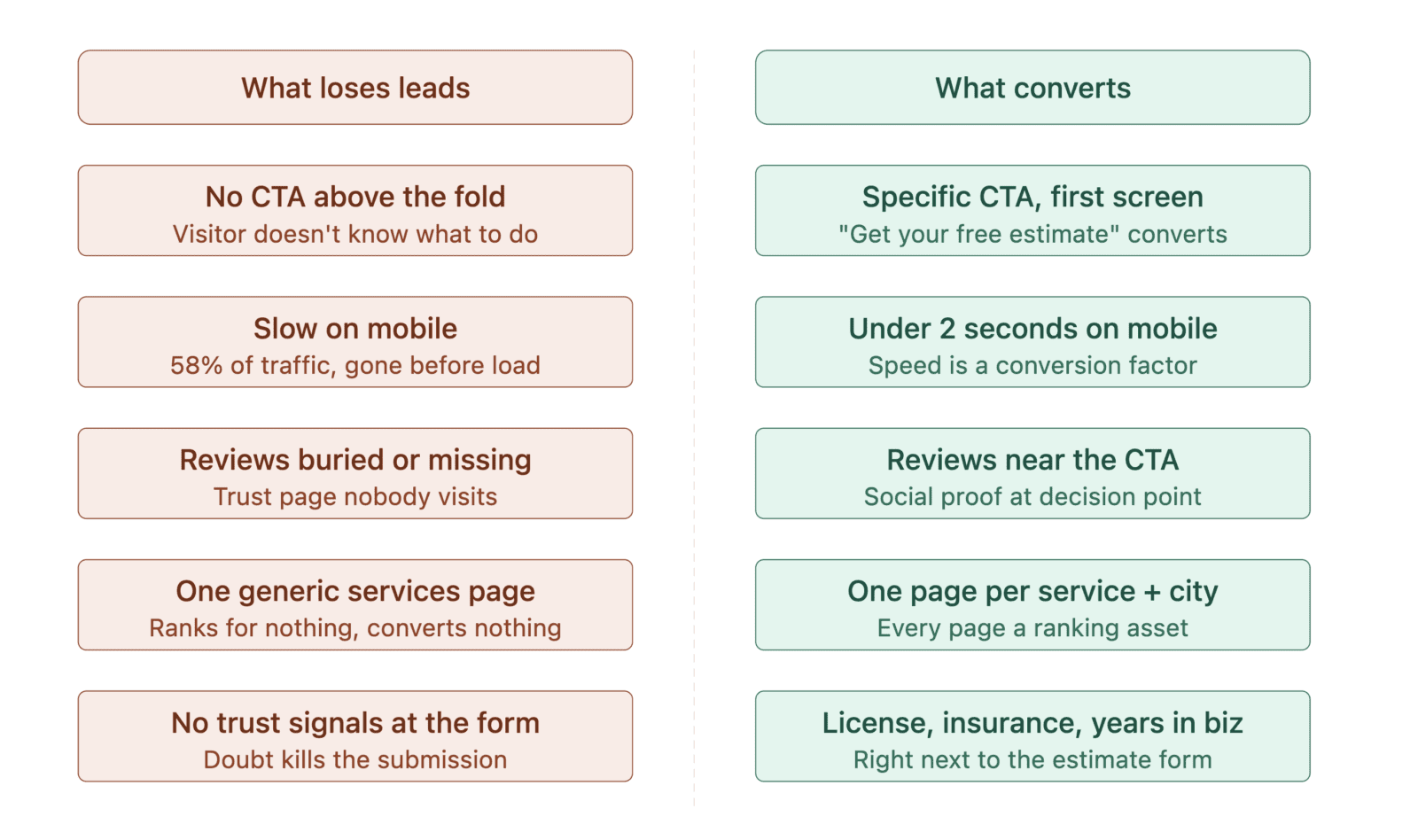
The fold is what a visitor sees before they scroll. If your homepage doesn’t have a specific, visible call to action in the first screen — “Get a Free Estimate,” “Call Now,” “Schedule Your Inspection” — you’ve already lost most of your visitors. They don’t know what to do next. So they leave.
A call to action needs to be specific, visible, and tied to a low-risk next step. “Contact Us” is not a call to action. It’s a link to a form nobody wants to fill out. “Get Your Free Roof Inspection” is a call to action. The specificity is what converts.
2. Too Slow on Mobile
58% of global internet traffic now comes from mobile, and the average mobile page takes 8.6 seconds to load. 53% of mobile visitors abandon a site that takes longer than 3 seconds, and every 1-second delay reduces conversions by 7%. For a contractor getting 500 visitors a month, that’s real jobs walking out the door because a page loaded slowly.
Speed is not a technical nicety. It’s a conversion factor. If your site isn’t under 2 seconds on mobile, it’s costing you leads.
3. No Social Proof Where It Matters
Reviews on Google are one thing. Reviews on your website — on the pages where people are deciding whether to call you — are another. Most contractor websites hide their testimonials on a separate page nobody visits, or skip them entirely.
Social proof needs to be on your homepage, on your service pages, and near your call to action. A three-sentence quote from a real customer placed directly above your estimate form converts. A testimonials page that requires three clicks to find does nothing.
4. Generic Service Pages That Rank for Nothing
One page called “Services” with a paragraph about each thing you do is not a lead generation asset. It’s a dead end. Google can’t rank it for anything specific. Homeowners can’t confirm that you do exactly what they need. And you can’t link to anything from your Google Business Profile or your blog posts.
Every service needs its own page. Every market you serve needs its own page. A roofing contractor serving three counties needs three location pages and at least four service pages — that’s seven indexed assets working for you instead of one page doing nothing. See how Social Status structures website design for trades businesses that need to rank and convert.
Landscaping companies selling design-build work need one page per project type — covered in how to get landscaping clients.
5. No Trust Signals at the Decision Point
By the time a homeowner is looking at your estimate form, they’ve already decided they might hire you. What stops them from submitting is doubt — are you licensed? Are you insured? Have you done this type of job before in their area? If those questions aren’t answered on the same page as the form, you lose them.
License number, insurance statement, years in business, service area, and a photo of your crew or a recent project should all live near your CTA. Not on an About page. Right there, at the moment of decision. That’s where trust signals convert.
What a Contractor Website That Actually Converts Looks Like
A lead-generating contractor website isn’t complicated. It has a clear structure, fast load times, and a specific path for visitors to follow. Here’s what that looks like in practice:
Homepage — One clear headline that states who you serve and what you do. A specific CTA above the fold. Three to five trust signals visible without scrolling. Recent reviews. A photo of your actual team or work, not a stock image.
Service pages — One page per service. Specific, not general. “Roof Replacement in [City]” outperforms “Roofing Services” every time — in rankings and in conversions. Each page answers the homeowner’s three questions: Can you do this job? Have you done it before? How do I get started?
Location pages — If you serve multiple cities or counties, each gets its own page. This is what gets you into the map pack across your full service area. See the full local SEO approach for contractors and how these pages compound your visibility.
Contact and estimate forms — Short. Three to five fields maximum. Name, phone, service needed, zip code. Every additional field reduces your conversion rate. The goal is a submitted form, not a completed intake questionnaire.
Speed — Under 2 seconds on mobile. Non-negotiable. Everything else on this list is irrelevant if the page doesn’t load.
This is the difference between a website that costs you money every month and one that generates it. Contractor lead generation work always includes a website audit, because a broken site undermines every other marketing investment you make.
The Website Mistake That Costs Contractors the Most
The single most common and costly mistake: building a website once and leaving it alone.
A static website is a dying website. Google rewards freshness. Homeowners trust businesses that look active. Your competitors are adding new project photos, new service pages, and new blog posts. A site that hasn’t been updated since it launched reads as a business that isn’t busy — or worse, isn’t around.
Contractors generating consistent leads from their websites update content, add project photos, publish blog posts that answer real questions, and build internal links between their service and location pages. It’s a system, not a one-time project.
If you’re not sure whether your current website is built to convert or just built to exist, a Revenue Map Call is exactly what you need. Social Status reviews your site speed, page structure, CTA placement, trust signals, and internal link architecture, then tells you what’s working and what’s costing you leads.
A website that doesn’t convert isn’t neutral. It’s actively sending your traffic to competitors who built theirs to close.
Is your website working, or just sitting there?
A Revenue Map Call identifies exactly where your site is losing leads and what to fix first.
Frequently Asked Questions
Why doesn’t my contractor website generate leads?
Most contractor websites fail to generate leads because they were built to look good, not to convert. Common failures include no clear call to action above the fold, slow mobile load times, generic service pages that rank for nothing, missing social proof at the decision point, and no trust signals near the estimate form. Social Status audits all five before recommending any redesign because, in most cases, the structure is the problem rather than the design.
What should a contractor website include to generate leads?
A specific call to action above the fold, dedicated pages for each service and each location you serve, real reviews visible on service pages rather than buried on a testimonials page, trust signals near the estimate form, and a load time under 2 seconds on mobile. Every element should serve one path: getting the visitor to submit a form or make a call.
How many pages should a contractor website have?
At minimum, one page per service and one page per primary city or county you serve. A roofing contractor covering three areas with four service types should have at least seven indexed pages beyond the homepage. More specific pages mean more ranking opportunities and more conversion paths, which is why a single “Services” page is one of the most expensive shortcuts in contractor marketing.
Does website speed really affect contractor leads?
Yes. Every 1-second delay in load time reduces conversions by roughly 7%, and 53% of mobile visitors abandon a page that takes longer than 3 seconds. With 58% of internet traffic now coming from mobile, a slow site is costing you leads every day. Under 2 seconds on mobile is the standard.
What is the difference between a contractor website that converts and one that doesn’t?
A converting site gives visitors a clear next step immediately, puts social proof at the decision point, runs dedicated service and location pages, and loads fast on mobile. A non-converting site describes the business and waits. Structure determines whether traffic becomes leads, not design — which is why redesigns that only change how a site looks rarely change how it performs.
Written by Elena Patrice — Founder and President of Social Status Inc. Since 2018, building local search visibility and growth systems for trades and service businesses ready to scale. Learn more →